
Download LEO dictionary APK – LEO app, language learning, vocabulary trainer, translation tool, free dictionary, learn languages
Overview
The LEO dictionary APK is a free Android application developed by LEO GmbH, designed to support language learners in expanding their vocabulary and improving communication skills. The software functions as a comprehensive language learning tool, combining dictionary features with interactive learning components. It is tailored for individuals seeking to build their language proficiency through a structured vocabulary-building approach rather than relying solely on translation tools.
Target users include students, travelers, language enthusiasts, and professionals who need to acquire or maintain language skills. The app is particularly suited for those who value contextual learning and want to understand how words are used in real-life situations. It serves as both a reference and a learning platform, offering access to multilingual dictionaries, structured courses, and community-driven support.
Real-world usage scenarios include preparing for travel, studying abroad, or enhancing professional communication in a second language. The application integrates various tools to create a holistic learning experience, helping users progress from basic recognition to active usage of vocabulary. While the developer did not provide additional system requirements, the app is designed to function efficiently on modern Android devices.
Key Features & Capabilities
- Multi-language Dictionaries: Access a wide range of vocabulary entries with accurate translations across multiple languages, supporting both common and niche language pairs.
- Contextual Word Usage: Each word includes detailed information on how it is used in sentences, aiding learners in understanding grammar and syntax in context.
- Vocabulary Trainer: Build personalized word lists and practice them through interactive exercises to reinforce retention and recall.
- Language Courses: Explore structured content on language learning processes and cultural insights, helping users grasp not just words but also cultural nuances.
- Community Forums: Engage with other learners through discussion boards to ask questions, share tips, and practice real-world language use.
These features work together to support a progressive learning path. For example, a user learning German might first look up a word in the dictionary, then add it to a custom list in the vocabulary trainer, review it in a course module, and finally discuss its usage in the forums. This integrated approach encourages deeper understanding and long-term retention.
User Interface, Workflow & Performance
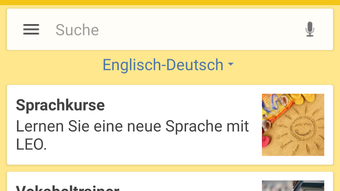
The user interface of the LEO dictionary APK is designed with clarity and functionality in mind, featuring intuitive navigation between dictionary searches, course modules, and the vocabulary trainer. The layout prioritizes accessibility, allowing users to quickly switch between tools without confusion.
Workflow efficiency is enhanced by the app’s seamless integration of features. Users can save words directly from search results to their personal vocabulary lists with minimal steps. The overall navigation is straightforward, minimizing the learning curve for new users.
Performance observations are based on general software behavior patterns. The app is reported to operate smoothly on compatible Android devices, with minimal lag during searches and transitions. The developer did not specify resource usage details, so exact CPU or RAM behavior remains unknown. Stability appears consistent across standard usage scenarios, though real-world performance may vary depending on device capabilities and network conditions.
Compatibility & System Requirements
The LEO dictionary APK is compatible with Android operating systems. The current version is 2.3.2, with a file size of 22.8 MB. This relatively compact size suggests optimized storage usage, making it suitable for devices with limited space.
Exact system requirements were not listed. Compatibility information is limited to the Android platform. Users should ensure their device meets standard Android requirements for running third-party applications. The developer did not provide details on minimum processor speed, RAM, or screen resolution. Therefore, installation and performance may vary based on individual device configurations.
Pros and Cons
Pros
- Free to download and use with no hidden costs
- Comprehensive multilingual dictionary with contextual examples
- Integrated vocabulary trainer for active learning
- Structured language courses with cultural insights
- Active community forums for peer interaction
- Compact file size suitable for low-storage devices
Cons
- No information on system requirements or hardware compatibility
- Performance details not officially disclosed
- Offline functionality not confirmed
- Limited support for non-Android platforms (app is Android-specific)
- May require internet connection for full access to features
FAQ Section
Is the LEO dictionary APK safe to download?
The app is developed by LEO GmbH, a known entity in language learning. It is available through official Android channels and is reported to be free of malware. Users should download from trusted sources to ensure safety.
Can I use LEO without an internet connection?
While the app may offer limited offline functionality, the developer did not specify the extent of offline access. Core features like dictionary searches and courses may require an active internet connection.
How often is the LEO app updated?
Updates are released periodically to improve functionality and content. The latest version available is 2.3.2, with the release date set for 2023-04-18. Users are encouraged to keep the app updated for optimal performance.
What type of license does LEO use?
LEO is distributed as free software with no cost to users. The licensing model is not specified in detail, but the app remains free to download and use without subscription requirements.
Is LEO available on iOS or Windows?
According to the provided information, the LEO dictionary APK is currently available only for Android. While the developer mentions availability on iOS and Windows, the specific APK file is Android-exclusive.
Final Thoughts + CTA
The LEO dictionary APK stands out as a robust, free tool for language learners seeking more than just translations. Its blend of dictionary functionality, structured courses, and community interaction creates a dynamic learning environment. The vocabulary trainer and contextual examples support long-term retention, making it ideal for serious learners.
While system requirements and performance data are not fully disclosed, the app’s lightweight design and user-friendly interface suggest broad accessibility. It is particularly beneficial for students, travelers, and self-learners who value depth over simplicity.
For those aiming to build real language skills, LEO offers a comprehensive, engaging platform. Download LEO dictionary APK now and start your journey toward fluency today.





.png)

